



Description
Download Temp File Cleaner – temp file cleaner, temporary files, PC cleanup, disk space, Windows utility, system optimization
Overview
Temp File Cleaner 4.4 is a utility application designed to assist users in managing and removing temporary files and digital clutter that accumulate on Windows systems over time. The primary purpose of the app is to free up disk space and support system optimization by targeting unnecessary files from various sources, including operating system caches, browser data, and third-party applications such as Java and Flash Player. This makes it a relevant tool for individuals seeking to maintain a clean and efficient computing environment.
Target users include home users, casual computer operators, and anyone managing a personal Windows PC who wants to improve performance through routine maintenance. While the app is marketed as a system optimization tool, its effectiveness is tied to the accuracy and safety of its file detection and deletion processes. The developer, Temp File Cleaner, positions the app as a free solution for personal use, though the licensing model includes some ambiguity around feature access.
Real-world use cases involve periodic cleanup after software installations, browser usage, or system updates, where temporary files can accumulate and consume valuable storage. In the broader app ecosystem, Temp File Cleaner fills a niche within the utilities category, offering a lightweight alternative to more complex system maintenance tools. However, its user interface and licensing clarity remain points of concern, which may affect user trust and long-term adoption.
Key Features & Functionality
- Comprehensive PC Cleaning – The app scans multiple directories across the system, including temporary file folders, cache storage, and application-specific data, to identify and remove unnecessary files. This helps reclaim disk space and reduce system clutter.
- Browser and Application Data Cleanup – Temp File Cleaner targets data from web browsers and installed programs like Java and Flash Player, ensuring that residual files from these platforms are safely removed.
- Customizable Color Schemes – Users can choose from a variety of interface themes, such as Pectoral fin Peach, Gangrene Green, and Clockwork Orange, allowing for a personalized visual experience.
- Automated Cleaning Options – The app supports scheduled cleanups, enabling users to set recurring maintenance tasks without manual intervention.
- Safe Deletion Protocol – Files are flagged for removal only after verification, minimizing the risk of accidental deletion of critical system components.
For example, a user who frequently downloads software or browses the web may benefit from a weekly cleanup to prevent storage bloat. Similarly, individuals with older or low-capacity drives can leverage the tool to maintain optimal performance. The inclusion of themed interfaces adds a touch of personalization, though it does not impact core functionality.
Interface, UX & Performance
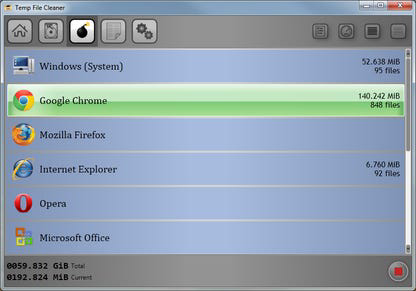
The user interface of Temp File Cleaner presents a mix of visual customization and usability challenges. While the availability of unique color schemes enhances aesthetic appeal, the overall layout may feel overwhelming due to non-standard design choices. For instance, the use of a bomb icon to represent cleaning tasks and separate controls for selecting entries and hiding interface elements can disrupt intuitive navigation.
Navigation appears to rely on a central dashboard with categorized file types, but the lack of clear visual hierarchy and consistent labeling may confuse first-time users. Although the developer did not list formal performance metrics, the app’s 2.7 MB file size suggests it is lightweight and should run efficiently on most Windows systems. Responsiveness appears adequate for basic operations, though complex scans may cause temporary delays.
Stability is not explicitly detailed, but the absence of reported crashes in public sources indicates a generally reliable execution. However, the lack of tooltips, help documentation, or onboarding guidance may hinder user confidence, especially for less tech-savvy individuals. Overall, the app delivers core functionality but falls short in delivering a polished, user-centric experience.
Platform Compatibility & Technical Requirements
Temp File Cleaner is designed for the Windows platform and is compatible with current versions of the Windows operating system. The app’s software version is 4.4, released on March 15, 2024. It has a file size of 2.7 MB, indicating a compact footprint suitable for systems with limited storage.
The developer did not specify minimum OS requirements, nor did they provide details about hardware compatibility or system specifications. As such, users should ensure their system meets general Windows compatibility standards. No additional dependencies or runtime environments were mentioned. The app is available as a free download, with no visible in-app purchases or subscription models at this time.
Pros and Cons
Pros
- Lightweight size (2.7 MB) for fast installation and minimal resource usage
- Comprehensive scanning across system, browser, and application directories
- Supports automated cleaning schedules for consistent maintenance
- Offers customizable color schemes for personal interface preferences
- Free for personal use, with no visible cost for core features
Cons
- Confusing user interface with non-intuitive icons and layout
- Unclear licensing model regarding feature access and restrictions
- Limited documentation and onboarding for new users
- No official support for macOS or Linux platforms
- May not offer significant advantages over other free utilities in the market
FAQ
Is Temp File Cleaner safe to use?
The app is designed to remove only temporary and non-essential files. However, users should exercise caution and avoid deleting files unless they are certain of their purpose. The developer claims a safe deletion protocol, but no third-party verification was provided.
Can I use Temp File Cleaner on multiple devices?
The app is licensed for personal use, but the developer did not specify whether a single license covers multiple Windows installations.
Does Temp File Cleaner require an internet connection?
While the app does not need constant connectivity, it may access online resources during updates or license validation, though this was not confirmed in the provided details.
Is there a mobile version of Temp File Cleaner?
The app is currently available only for Windows. No mobile or cross-platform versions were listed in the provided information.
How often should I run a cleanup?
Users may benefit from running the cleanup weekly or after major software installations. The app supports scheduling, allowing for automated maintenance without manual input.
Final Thoughts
Temp File Cleaner offers a functional approach to managing temporary files and optimizing disk space on Windows systems. Its lightweight design and automated cleaning features make it a viable option for users seeking a simple utility. However, the unclear licensing model and confusing interface may deter some users, particularly those unfamiliar with system maintenance tools.
While it performs adequately in core tasks, its lack of clarity and competition from more polished free alternatives limit its appeal. For users prioritizing ease of use and transparency, exploring other well-established utilities may be advisable.
Download Temp File Cleaner now
Guides & Tutorials for Temp File Cleaner
How to install Temp File Cleaner
- Click the Preview / Download button above.
- Once redirected, accept the terms and click Install.
- Wait for the Temp File Cleaner download to finish on your device.
How to use Temp File Cleaner
This software is primarily used for its core features described above. Open the app after installation to explore its capabilities.
User Reviews for Temp File Cleaner 0
No reviews found


